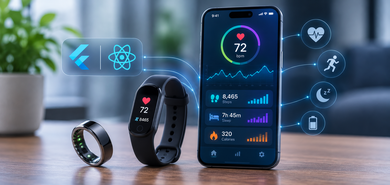
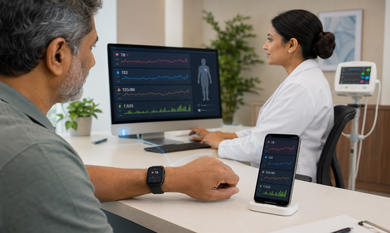
A fitness wearable can collect a wide range of information throughout the day. Heart rate readings show how the body responds to different activities, activity tracking records movement and exercise, and sleep monitoring provides information about rest patterns. Individually, these measurements are useful. Together, they can provide a more complete picture of a user's fitness journey.
However, many fitness applications still present these metrics in separate sections or depend on different platforms to collect the information. Users may need to switch between multiple screens to understand their daily activity, heart rate patterns, and sleep quality.
For businesses developing wearable products, this creates an opportunity to build a unified fitness dashboard that brings all these measurements together.
Combining this information requires more than designing a dashboard. It involves wearable connectivity, API integration, data standardisation, cloud storage, and meaningful data visualisation. Here is how businesses can approach the development process.
1. Identify the Data Your Fitness Dashboard Needs
Before integrating wearable devices, define which measurements the application should collect and display. The required data will depend on the product, its target users, and the decisions the dashboard is expected to support.
Three important categories form the foundation of most fitness dashboards.
Heart Rate Data
Heart rate information helps users review cardiovascular activity throughout the day. Depending on the wearable device, the application may receive:
- Current and average heart rate.
- Resting heart rate.
- Heart rate during workouts.
- Maximum and minimum readings.
- Heart rate trends over time.
Activity Data
Activity information helps users understand their movement and exercise patterns. Common measurements include:
- Daily step count.
- Distance travelled.
- Active minutes.
- Calories burned estimates.
- Workout duration and type.
- Activity frequency and intensity.
Sleep Data
Sleep tracking provides information about users' sleeping patterns. Depending on the device and its capabilities, the application may receive:
- Total estimated sleep duration.
- Bedtime and wake-up time.
- Sleep consistency.
- Sleep stages, when supported.
- Sleep interruptions.
- Night-time heart rate measurements.
Defining these data requirements early helps development teams identify the right device integrations, APIs, and dashboard components.
2. Connect Wearable Devices and Health Platforms
The next step is collecting data from different wearable sources. A fitness product may support smartwatches, fitness bands, smart rings, or other connected devices.
There are several ways to establish these connections.
Direct Bluetooth Low Energy Integration
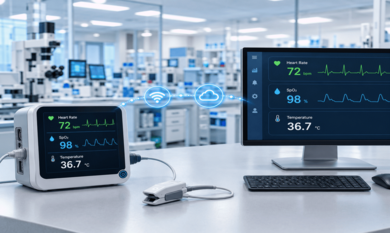
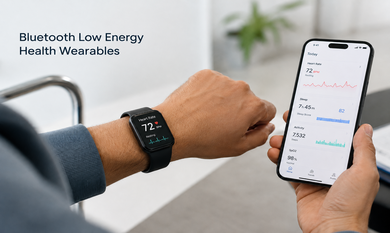
Bluetooth Low Energy (BLE) allows compatible wearable devices to communicate with mobile applications while using relatively low power. A companion app can receive supported sensor information and transfer it to the backend.
For example, a fitness band may send heart rate measurements to a mobile application, which then synchronises the information with the cloud platform.
Businesses developing custom wearable products may require BLE app development services to establish device pairing, manage communication, process incoming sensor data, and support reliable connectivity.
Apple HealthKit and Android Health Connect
Applications can also collect supported health and fitness records through platform-level health data services.
Apple HealthKit allows authorised applications to read and write supported health information based on user permissions. Android Health Connect provides a common way for compatible applications to access supported health and fitness records with user consent.
These integrations can help fitness platforms consolidate information from multiple compatible sources without developing a separate direct connection for every wearable.
The integration strategy should consider device compatibility, permission requirements, available data categories, and the frequency of data updates.
3. Standardise Heart Rate, Activity, and Sleep Records
One of the biggest challenges in combining wearable data is that different devices may record and represent information differently.
For example, one wearable may provide heart rate samples at frequent intervals, while another may provide aggregated readings. Sleep information may also differ in the way devices classify sleep stages or identify the beginning and end of a session.
A unified dashboard needs a standardised data structure.
Development teams should establish consistent formats for:
- Measurement units, such as beats per minute for heart rate.
- Timestamps and time zones.
- Activity categories and workout types.
- Sleep session start and end times.
- Device and data-source identification.
- User and device association.
It is also important to retain the original source and measurement time. The time a wearable records information may differ from the time the application receives or synchronises it.
A standardised data layer makes it easier to compare records, build analytics, and support additional wearable brands in the future.
4. Build a Unified Dashboard with Meaningful Visualisations
Once the data is collected and standardised, the next step is presenting it in a way users can understand.
A useful fitness dashboard should provide an overview of daily activity while allowing users to explore individual measurements.
Heart Rate Overview
Display resting heart rate, average readings, workout-related heart rate, and trends over selected periods. Line charts can help users review changes throughout the day or compare readings across multiple days.
Activity Summary
Use progress indicators, activity timelines, and charts to show steps, distance, active minutes, and workout duration. Users should be able to filter information by day, week, or month.
Sleep Insights
Show estimated sleep duration, sleep timing, and supported sleep-stage information. Weekly trends can help users understand consistency rather than relying on a single night's reading.
Combined Health and Fitness View
The main advantage of a unified dashboard is the ability to review these measurements together.
For example, a user may compare the previous night's sleep duration with the following day's activity and heart rate patterns. A fitness platform can display these trends side by side to support personal tracking.
The dashboard should make it easy to move from an overall summary to detailed records without overwhelming users with too many charts or technical measurements.
5. Use Cloud Infrastructure for Data Storage and Synchronisation
Fitness applications need a reliable backend to store and process information collected from wearable devices.
A cloud-based architecture can help manage incoming records from multiple users and connected devices. It also supports synchronisation between mobile applications, web dashboards, and other business systems.
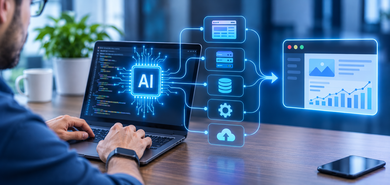
A typical architecture may include:
- A mobile application or device gateway to receive wearable data.
- API services to transfer information securely.
- A backend processing layer to validate and standardise records.
- A database to store historical measurements.
- Cloud infrastructure to support application availability and scaling.
- Dashboard APIs to deliver relevant information to users.
For companies building connected fitness products, IoT application development can help connect wearable devices, applications, cloud services, and analytics systems into a coordinated solution.
Businesses should also consider cloud consulting services when planning secure storage, application deployment, backend modernisation, and infrastructure that can scale as the number of connected users increases.
6. Add Analytics to Identify Patterns Across Different Metrics
A unified dashboard becomes more valuable when it helps users understand patterns rather than simply displaying individual measurements.
For example, a fitness application could allow users to review:
- Changes in resting heart rate over several weeks.
- Activity levels across different days.
- Sleep duration alongside daily workout frequency.
- Workout intensity and recovery-related trends.
- Consistency in sleep and exercise routines.
Analytics can also help product teams develop features such as personalised summaries, progress reports, and configurable notifications.
However, the application should distinguish between measured information and inferred insights. A relationship between sleep duration and activity does not automatically establish that one caused a change in the other. Health-related recommendations should be appropriately validated and should not present general fitness analytics as a medical diagnosis.
7. Test Data Accuracy, Privacy, and Dashboard Performance
Before launching a fitness dashboard, businesses need to validate the complete data flow.
Testing should cover device pairing, API permissions, data synchronisation, timestamp handling, duplicate records, and interrupted connections.
For example, if a user records an activity through two connected platforms, the application should have clear rules for identifying overlapping records and avoiding incorrect totals.
Privacy and security are equally important. Fitness applications may handle sensitive personal information, so developers should implement appropriate consent management, access controls, encryption, and data-retention policies.
The dashboard should also be tested across supported devices, operating systems, screen sizes, and network conditions to ensure a consistent experience.
How Theta Technolabs Helps Build Connected Fitness Applications
Building a unified fitness dashboard requires expertise across multiple technology layers. Businesses may need to integrate existing wearable hardware, develop a new fitness application, or enhance an existing platform with additional data sources and analytics.
Theta Technolabs works with businesses to develop connected software solutions based on their product requirements.
Our capabilities can support:
- Wearable hardware integration: Connecting compatible smart rings, fitness bands, sensors, and other devices with software applications.
- Mobile application development: Building applications that collect and present fitness information across supported platforms.
- BLE and IoT development: Establishing device communication and integrating connected hardware with applications and backend systems.
- Cloud and API integration: Creating data pipelines and backend services for synchronisation, storage, and information exchange.
- Dashboard and analytics development: Building interfaces that help users explore fitness measurements, trends, and activity summaries.
- Existing application enhancement: Improving current applications through new integrations, dashboard features, performance improvements, and modernisation.
Whether a business is launching a new wearable product or improving an established fitness platform, the solution should connect its hardware, software, and data into one reliable experience.
Conclusion
Combining heart rate, activity, and sleep data in one fitness dashboard requires a well-planned integration strategy. Businesses need to connect compatible wearable devices, standardise different data formats, establish reliable cloud synchronisation, and present information through clear visualisations.
The real value comes from bringing separate measurements into one connected experience where users can review their fitness trends over time.
As a software development company in India, Theta Technolabs helps businesses develop custom wearable and fitness software, integrate existing hardware, and enhance applications with connected-device capabilities and data analytics. With the right technology architecture, companies can turn wearable sensor data into a more useful and scalable digital fitness product.